Water Safety Ireland are encouraging all teachers and parents to explore water safety with children and young people at this time.
With warm weather comes lots of extra water play and it is predicted that this summer will see a surge in the national usage of beaches, rivers, lakes and waterways as a result of people not being able to travel abroad. Despite the pleasure water brings, it must always be treated with caution. Children and young people are an at-risk drowning group so it is very important to teach water safety skills from the earliest age.
With resources for children of all ages, Water Safety Ireland’s PAWS (Primary Aquatics Water Safety) programme outlines the essential life-saving guidelines that every child needs to know. To access their programme visit www.teachpaws.ie
Water Safety Ireland have teamed up with RTÉ Home School Hub to promote the PAWS programme this week. They are running a colouring competition with a chance of winning one of 4 x €50 Elverys Sports vouchers. To enter, download the picture available HERE and send your artwork to paws@watersafety.ie.
Include your name, class level, school and winners will be announced on RTÉ’s Home School Hub on Thursday 4th of June.
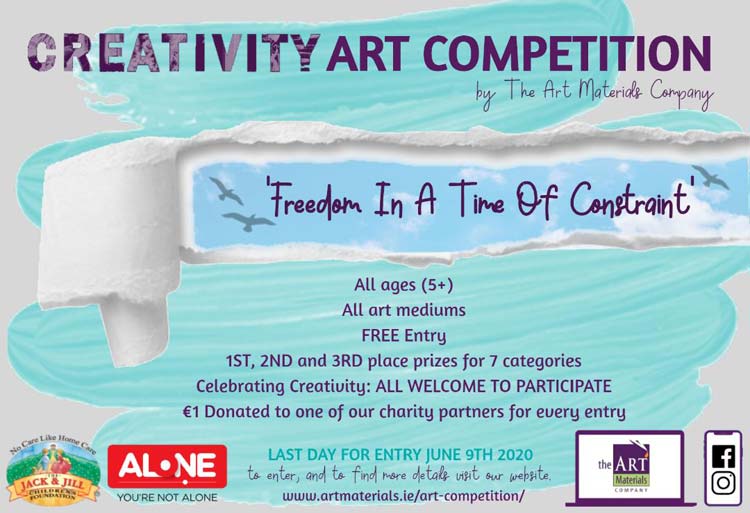
Artmaterials.ie are among Ireland’s leading online art materials supply shops. Simply by entering, you receive a promo code entitling you to 20% off an art supplies order. In addition, for every entry they receive, they will donate €1 to their charity partners The Jack and Jill Foundation and Alone.
Entries must reflect the theme ‘Freedom in a Time of Constraint’ and will be accepted from amateur artists as well as those established in the art world.
Entrants can use any media they wish and entries can be submitted by individuals and teams. Entries must be submitted by midnight of June 9th 2020 via the entry form available HERE. Winners will be announced on June 30th.
For more information view the rules for entry which are available HERE.
“Creativity is contagious. Pass it on.” – Albert Einstein
The annual school sport’s day is one of the most enjoyable days on the school calendar. While schools may be closed, that does not mean that the annual school sport’s day is cancelled.
Why not have a virtual sport’s day instead, with the help of HealthyKidz.com?
HealthyKidz.com provide a holistic primary in-school and after school programme focusing on physical, emotional and general well-being. By working with children in schools, they aim to develop their speed and agility, strength, flexibility, balance, cardiovascular fitness and emotional well-being.
To get involved, schools and pupils can formally register to participate in the Healthykidz.com virtual sport’s day challenge and track your school’s virtual sport’s days via the Healthykidz.com app.
View HERE for more details about school and pupil registration.
If your school isn’t registered, HealthyKidz.com provide lots of free resources and ideas for parents and pupils. You can download the free ‘Virtual Sport’s Day Preparation Pack’ by viewing HERE.
In addition, preparation for the annual end of year virtual sports day is supported by videos and tips divided up over weeks of virtual training. Weeks 1 to 3 are already up and running.
Week 1 events include the sprint and long jump. View HERE.
Week 2 events include the high jump and the classic egg and spoon race. View HERE.
Week 3 events include the wellyboot toss and super strongman challenge. View HERE.
Why not get the whole family out to the back garden and have some fun while the weather remains sunny!
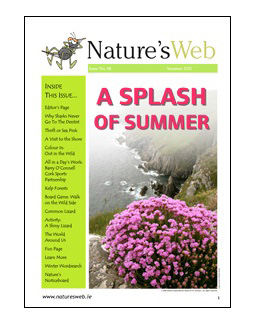
Get the kids reading ‘Nature’s Web’ and support science and nature, while learning at home.
‘Nature’s Web’ is an exciting magazine for children, featuring interesting and informative news on nature and the environment.
Nature’s Web Sherkin Island Marine Station carry out long-term monitoring programmes on the flora and fauna of Roaringwater Bay and its surrounding areas. The Station also aim to raise awareness of the marine environment in Ireland and help to introduce young people to nature. For more information visit http://www.sherkinmarine.ie/
‘Nature’s Web’ is free and the latest edition can be accessed by viewing HERE.
Contents include articles on the hermit crab; recipes for potato salad; information on teeth in the animal kingdom; puzzles; colouring pages and even a board game.
With home schooling out for the weekend; are you wondering how you will occupy your time today, with weather promising to be uncertain?
What about this project to hone your creative skills?
Follow these 7 steps to create Word Art just for fun or why not create something memorable for an upcoming friend’s birthday, a graduation or other special event.
Click ‘Create now‘, (Button with green Background, found centre page).
On the next screen click ‘Import‘ (Button on left hand side under the heading ‘WORDS‘). In the box that will appear, type a list of words, for example the names of people in your family. Then click ‘Import words‘, (Bottom right of that same white box).
Next Click ‘SHAPES‘. (Shown bottom left.)
Pick a shape, for example, the “Love Heart” in our picture shown above. Then click ‘Visualize‘, (Button Red background at top, middle, beside ‘Undo’) to see your word art creation.
Click on ‘Fonts‘ and then the red button ‘Visualize‘; to observe the effect of the different fonts. Likewise click ‘Layout‘ or ‘Style‘ and then ‘Visualize‘ to experiment with different layout and style options.
To save your creation, simply click download and save your Word Art as a .JPEG(or other file format), to email to friends and family, and to celebrate, for example a birthday.
Top Tip: If you want to make a word bigger and make it stand out more than any other chosen word, go to ‘WORDS‘ and click on that particular word you chose and under ‘Size‘, enlarge same and again hit the ‘Visualize‘ red button.
This website uses cookies to improve your experience. We'll assume you're ok with this, but you can opt-out if you wish.AcceptRead More
Privacy & Cookies Policy
Privacy Overview
This website uses cookies to improve your experience while you navigate through the website. Out of these, the cookies that are categorized as necessary are stored on your browser as they are essential for the working of basic functionalities of the website. We also use third-party cookies that help us analyze and understand how you use this website. These cookies will be stored in your browser only with your consent. You also have the option to opt-out of these cookies. But opting out of some of these cookies may affect your browsing experience.
Necessary cookies are absolutely essential for the website to function properly. This category only includes cookies that ensures basic functionalities and security features of the website. These cookies do not store any personal information.
Any cookies that may not be particularly necessary for the website to function and is used specifically to collect user personal data via analytics, ads, other embedded contents are termed as non-necessary cookies. It is mandatory to procure user consent prior to running these cookies on your website.






Recent Comments